Component View
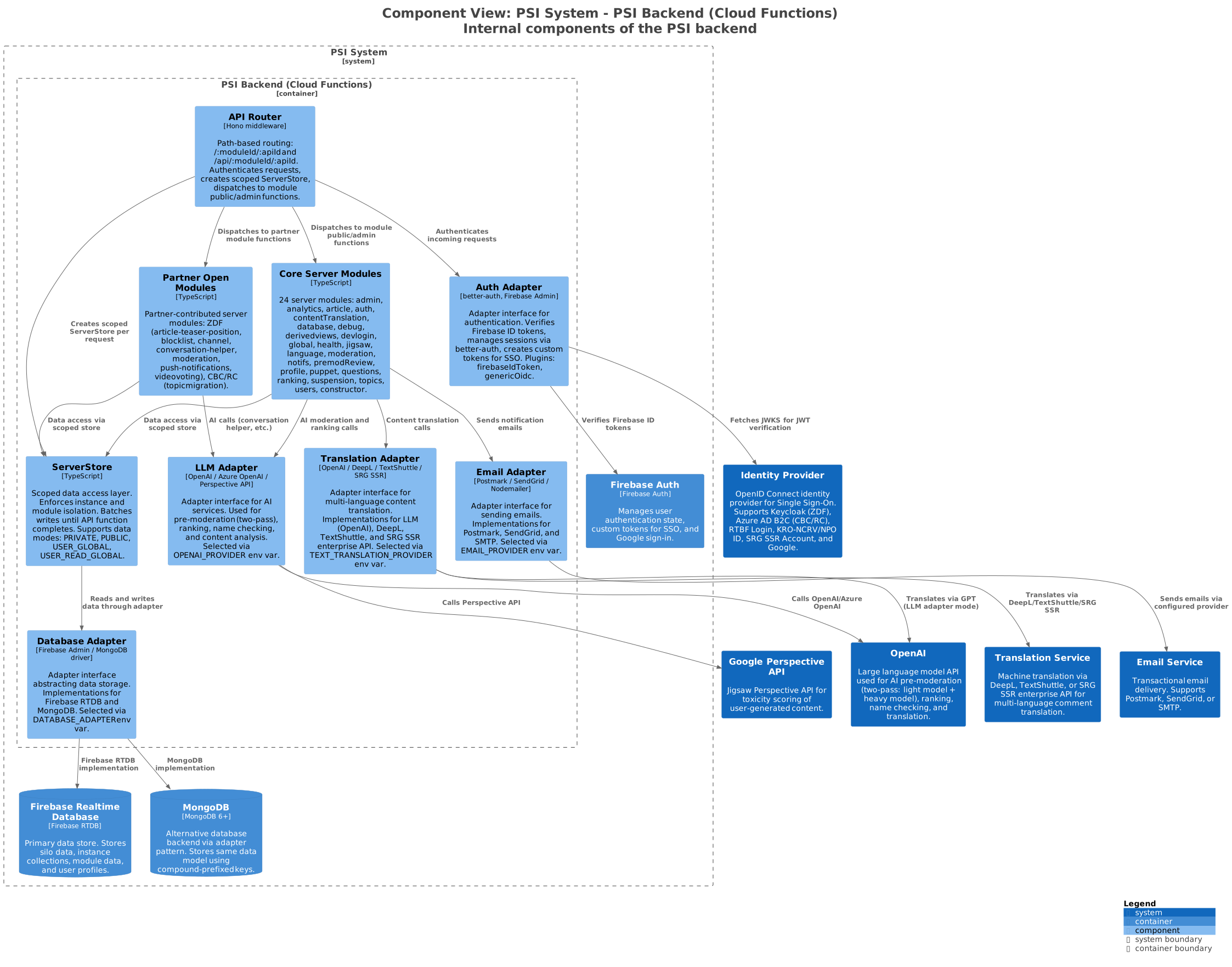
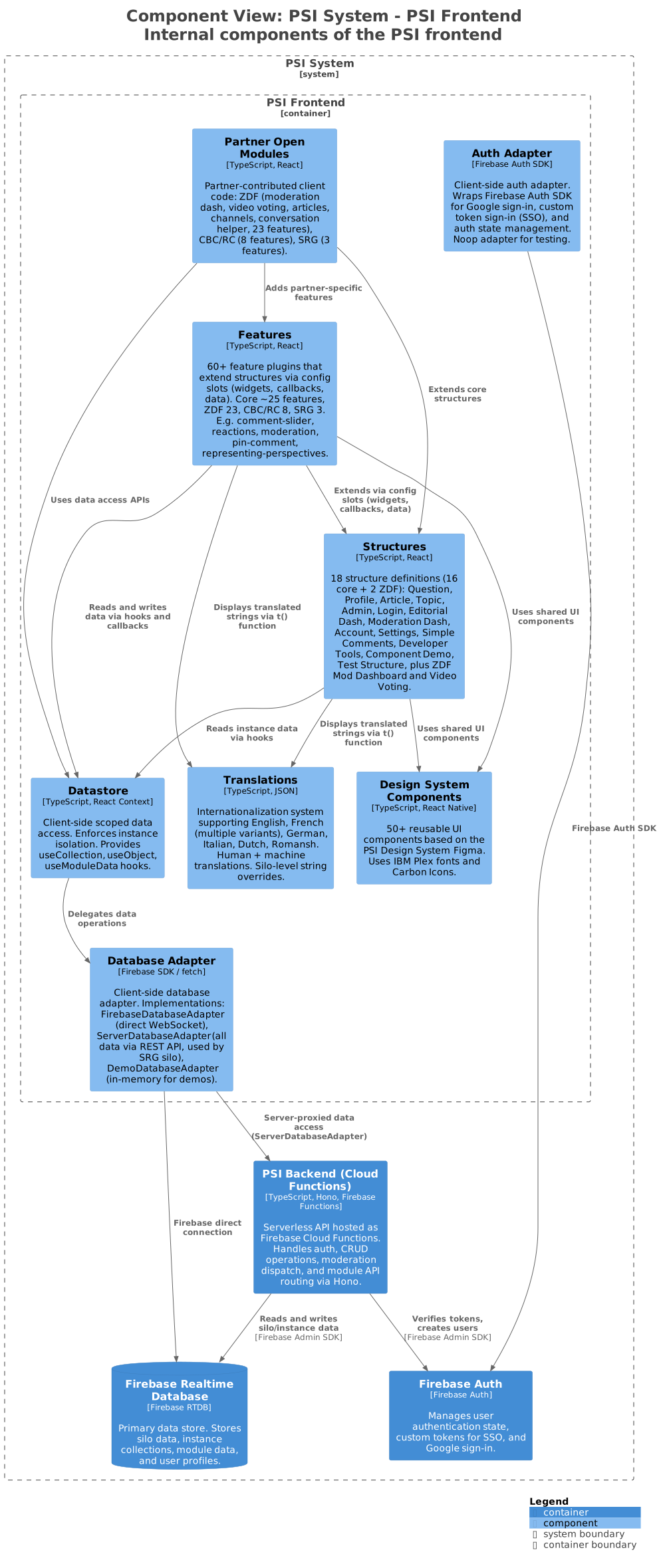
The component view (C4 Level 3) shows the internal architecture of the PSI backend and frontend containers.
Backend Components
API Request Lifecycle
Every API request follows this path:
sequenceDiagram
    participant Client as PSI Frontend
    participant Router as API Router
    participant Auth as Auth Adapter
    participant Store as ServerStore
    participant Module as Module Function
    participant DB as Database Adapter

    Client->>Router: POST /api/{moduleId}/{functionId}
    Router->>Auth: Verify Authorization header (Firebase ID token)
    Auth-->>Router: Session with user identity
    Router->>Store: Create scoped ServerStore(silo, structure, instance, user)
    Router->>Module: Call module.publicFunctions[functionId](store, params)
    Module->>Store: Read data (getCollection, getObject, getModuleData)
    Store->>DB: Delegate to database adapter
    DB-->>Store: Data result
    Store-->>Module: Data
    Module->>Store: Write data (setObject, addObject, setModuleData)
    Note over Store: Writes are batched, not yet committed
    Module-->>Router: Function returns
    Router->>Store: Commit batched writes
    Store->>DB: Execute all writes atomically
    Router-->>Client: JSON response
Core Server Modules
The backend includes 24 core server modules. Each module exports publicFunctions and/or adminFunctions:
| Module | Purpose |
|---|---|
admin | Admin user management, roles |
analytics | Event logging via Cloud Logging (feeds BigQuery) |
article | Article management |
auth | SSO token conversion, session management |
constructor | Article and profile constructors |
contentTranslation | Multi-language automatic content translation |
database | Database operations |
debug | Environment inspection, email template rendering |
derivedviews | Derived view trigger system (10 object + global triggers) |
devlogin | Development login helper |
global | Instance property management, feature defaults |
health | Health check endpoints (/health/live) |
jigsaw | Direct Perspective API toxicity measurement |
language | Language settings |
moderation | AI pre-moderation pipeline, content review, judgement, email notifications |
notifs | Reply notification emails |
premodReview | Pre-moderation review data collection for AI accuracy auditing (30-day GDPR TTL) |
profile | User profile management |
puppet | Test user puppet system (secret-protected) |
questions | Question metadata and configuration |
ranking | GPT-based comment quality/bridging scoring |
suspension | User warn/block/unblock with expiry tracking |
topics | Topic management |
users | User management |
Partner Open Modules (Server)
| Partner | Modules |
|---|---|
| ZDF | article-teaser-position, blocklist, channel, conversation-helper, moderation, push-notifications, videovoting |
| CBC/RC | topicmigration |
Frontend Components
Structure + Feature Plugin Architecture
The frontend's core design pattern:
Structure (e.g. Question)
  ├── Defines screens (main, composer, ...)
  ├── Defines config slots (widgets, callbacks, data)
  │
  ├── Feature: comment-slider
  │     └── Fills pageTopWidgets slot
  ├── Feature: reactions
  │     └── Fills commentActionWidgets slot
  ├── Feature: moderation
  │     └── Fills commentPostCheckers callback
  │     └── Sub-feature: ai-moderation
  │     └── Sub-feature: manual-moderation
  └── Feature: pin-comment
        └── Fills commentHeaderWidgets slot
Features are enabled per-instance. Different instances of the same structure can have different features active. Feature config values are merged using these rules:
- Arrays are appended across features
REPLACEwrapper fully replaces instead of appending- Deduplication by
keyfield; highestprioritywins
Core Structures
| Structure | Type | Description |
|---|---|---|
| Question | Multi-instance | A question users can answer (one answer per user) |
| Profile | Multi-instance | User profile with name, photo, and feature widgets |
| Article | Multi-instance | Content item that questions/topics attach to |
| Topic | Multi-instance | Discussion topic with threaded comments |
| Admin | Singleton | Admin dashboard with links to management tools |
| Editorial Dash | Singleton | Create and browse questions/topics |
| Moderation Dash | Singleton | Content moderation interface |
| Login | Singleton | Login screen with SSO provider selection |
| Component Demo | Singleton | Design system component showcase |
| Simple Comments | Multi-instance | Simplified comment thread without question framing |
| Account | Singleton | User's own account information |
| Settings | Singleton | User settings |
| Developer Tools | Singleton | Debug and inspection tools |
| Test Structure | Singleton | Automated testing structure |
Client Database Adapters
| Adapter | Mode | Description |
|---|---|---|
FirebaseDatabaseAdapter | Direct | Connects directly to Firebase RTDB via SDK (default) |
ServerDatabaseAdapter | Proxied | All data proxied through the PSI backend API |
DemoDatabaseAdapter | In-memory | For tests and demos, no external dependency |
The adapter is selected per-silo via configuration in psi.config.ts.
Next Level
Zoom into the Code Level (C4 Level 4) diagrams for detailed class and sequence diagrams of key subsystems:
- API Router Dispatch -- Hono middleware, module resolution, admin authorization
- Auth Adapter Stack -- better-auth, Firebase, OIDC plugin chain
- Database Adapter -- ServerStore, Firebase vs MongoDB, client adapters
- Moderation Pipeline -- two-pass AI flow, prompts, pre-mod review
- Plugin System -- structures, features, config slot resolution
- Translation Adapter -- multi-language content translation
Further Reading
- Authentication Flow -- how SSO and login work end-to-end
- Data Model -- detailed data access patterns
- Adapter Pattern -- how adapters enable swappable implementations
- Design concepts (psi-product) -- full developer reference