Container View
The container view (C4 Level 2) shows the major deployable units within the PSI system and how they interact.
PSI System Containers
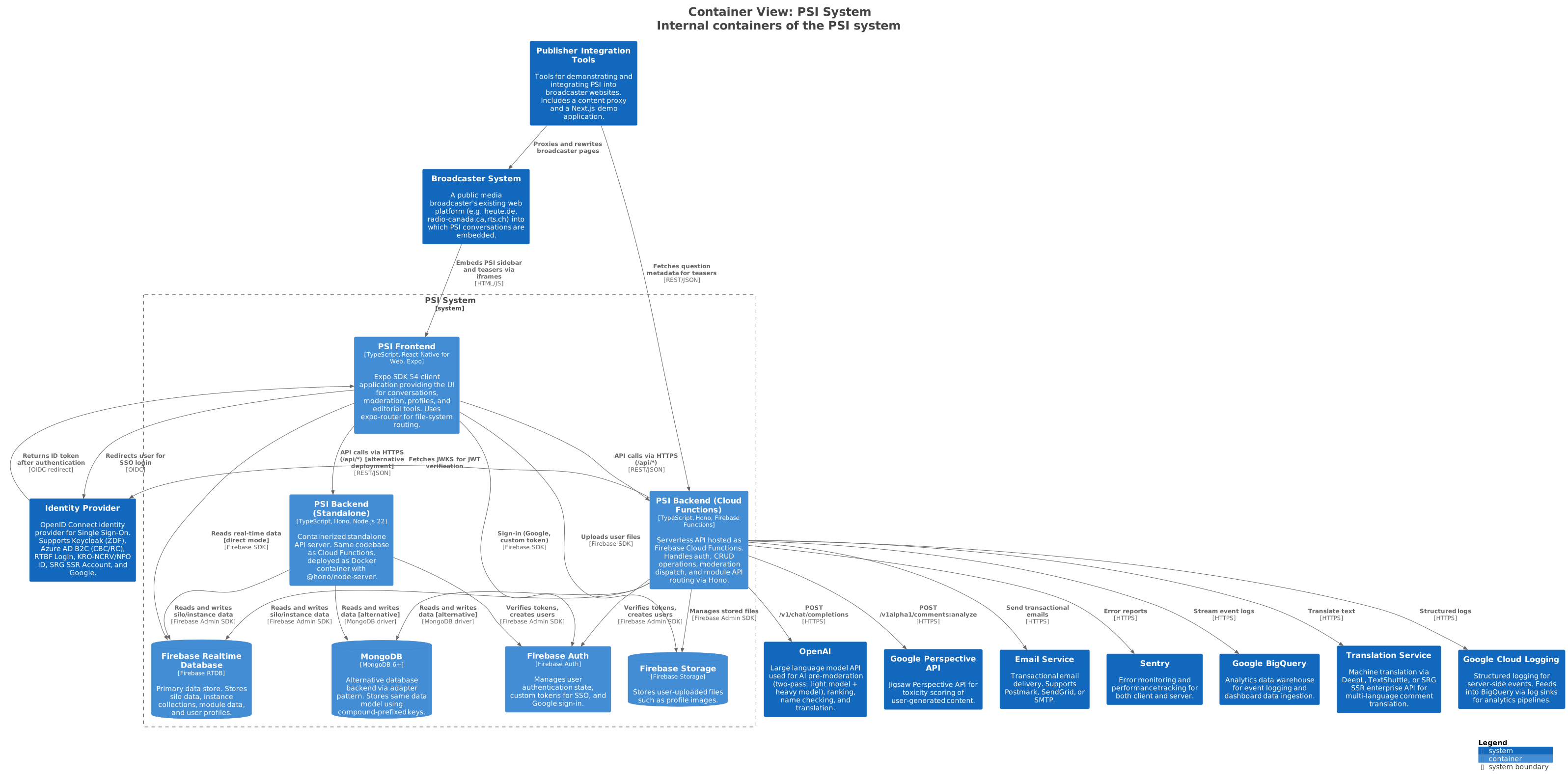
PSI Frontend
| Property | Value |
|---|---|
| Technology | Expo SDK 56, React Native for Web, expo-router, TypeScript |
| Deployment | Firebase Hosting (static SPA) |
| Routing | File-system routing: /{siloKey}/{structureKey}/{instanceKey}/{...} |
| State | Custom Datastore context (not Redux/Zustand) |
| Styling | React Native StyleSheet (cross-platform) |
| Icons/Fonts | Carbon Icons, IBM Plex Sans/Mono |
| Testing | Jest 29, @testing-library/react, Storybook 10 |
The frontend is built around the Structure + Feature plugin architecture:
- 13 structures define content types and screens (12 core + 1 ZDF): Question, Profile, Article, Admin, Login, Editorial Dash, Moderation Dash, Account, Settings, Developer Tools, Component Demo, Ranking Eval, plus ZDF Video Voting
- ~50 features extend structures via config slots (comment-slider, reactions, moderation, pin-comment, representing-perspectives, etc.)
- Design system with a reusable component library based on the PSI Figma (Carbon Icons, IBM Plex)
PSI Backend (Cloud Functions)
| Property | Value |
|---|---|
| Technology | Hono, Firebase Cloud Functions v1, TypeScript |
| Runtime | Node.js 22 |
| Entry | server/functions.ts (exports api as HTTPS function via getRequestListener) |
| API Pattern | /api/{moduleId}/{functionId} |
PSI Backend (Standalone)
| Property | Value |
|---|---|
| Technology | Hono, @hono/node-server, Node.js 22, TypeScript |
| Entry | server/index.ts (standalone mode with @hono/node-server, listens on PORT 5001) |
| Deployment | Docker container (Dockerfile.server) |
| Use Case | Non-Firebase deployments, local development |
Both deployment modes share the same Hono application created by createApp(). The request flow is:
- Hono routes match
/:componentId/:apiIdor/api/:componentId/:apiId - CORS middleware and context injection (authAdapter, databaseAdapter, modules)
- Create a
ServerStorescoped to the request's instance and user - Check admin authorization for admin-only functions
- Dispatch to matching module's
publicFunctionsoradminFunctions - Batch all writes and commit after the function completes
- Return JSON, HTML, text, or redirect response
Firebase Realtime Database
Primary data store. Data is organized as:
silo/{siloKey}/
  module/{moduleKey}/                 # PRIVATE module data (server-only)
  module-public/{moduleKey}/          # PUBLIC module data (all users can read)
  module-user/{userId}/{moduleKey}/   # USER_GLOBAL data (per-user read/write)
  module-user-read/{userId}/{moduleKey}/ # USER_READ data (user reads, server writes)
  structure/{structureKey}/
    instance/{instanceKey}/
      collection/{typeName}/{objectKey}  # Per-instance collections (comments, etc.)
      global/                            # Server-only instance properties
      global/features/                   # Enabled features dictionary
MongoDB (Alternative)
An alternative database backend available via the adapter pattern. Uses compound-prefixed keys for data locality:
| Collection | Key Pattern |
|---|---|
instances | {siloKey}:{structureKey}:{instanceKey} |
collection_objects | {siloKey}:{structureKey}:{instanceKey}:{collectionKey}:{objectKey} |
moduledata_{mode} | {siloKey}:{mode}:{moduleKey}:{userId}:{name}:{key1}:{key2} |
silos | {siloKey} |
Moderation Pipeline (in-process)
Content moderation is handled in-process by the PSI backend (server/modules/moderation.ts) using a two-pass LLM pipeline — it is not a separate deployable. Moderation runs alongside the API and writes decisions, blocklist entries, and review-queue items to the primary datastore:
- Two-pass moderation: Light model (
gpt-5.4-mini) for initial screening, heavy model (gpt-5.4) for flagged content - Blocklist management: server-side gate (
server/modules/blocklist.ts) checked before AI moderation - Pre-moderation review: flagged comments stored for human review (30-day TTL, GDPR-compliant)
- Database: uses the same Firebase RTDB or MongoDB backend as the rest of the server
See the Moderation Pipeline page for details.
Publisher Integration Containers
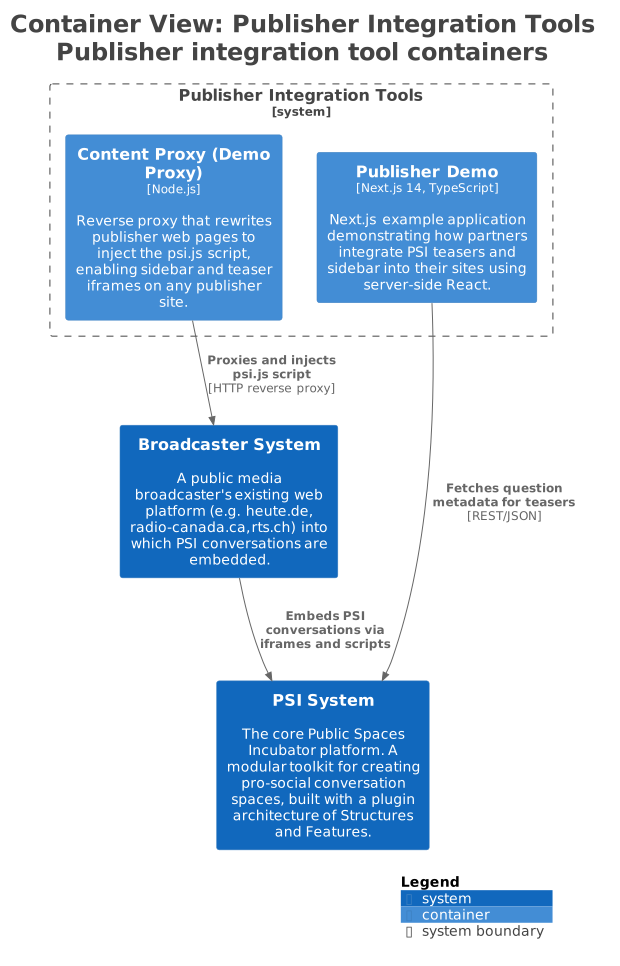
| Container | Purpose |
|---|---|
| Content Proxy | Rewrites broadcaster pages to inject psi.js for sidebar and teaser iframes. Used for demos without modifying the broadcaster's real site. |
| Publisher Demo | Next.js application demonstrating server-side teaser rendering, metadata API calls, and sidebar integration. |
Next Level
Zoom into the Component View to see the internal structure of the PSI backend and frontend.